![Enflux_Horizontal_2C-1.jpg]](https://knowledgebase.enflux.com/hs-fs/hubfs/Enflux_Horizontal_2C-1.jpg?height=40&name=Enflux_Horizontal_2C-1.jpg)
Navigation for this page:
How to Download AACP Surveys Data
Each data file provided to Enflux should be the original data file as downloaded from the NABP ---website and the AACP website. The data files are to be uploaded to your school's folder on Box .
NAPLEX
For each trimester (1, 2, and 3) for each year (2016 - 2020) your school took the NAPLEX, Enflux must receive the summary PDF report and the roster spreadsheet. Below are a list of example files for a single year.
|
Year |
Trimester |
File Type |
Sample File Name |
|
2018 |
Trimester 1 |
|
NAPLEX-001-2018 Trimester 1_20190223_112234.pdf |
|
2018 |
Trimester 1 |
XLSX |
NAPLEX Roster-001-2018 Trimester 1_20190223_112234.xlsx |
|
2018 |
Trimester 2 |
|
NAPLEX-001-2018 Trimester 2_20190223_112234.pdf |
|
2018 |
Trimester 2 |
XLSX |
NAPLEX Roster-001-2018 Trimester 2_20190223_112234.xlsx |
|
2018 |
Trimester 3 |
|
NAPLEX-001-2018 Trimester 3_20190223_112234.pdf |
|
2018 |
Trimester 3 |
XLSX |
NAPLEX Roster-001-2018 Trimester 3_20190223_112234.xlsx |
Starting in 2021, for each year (2021-present) your school took the NAPLEX Enflux must receive the summary PDF report and the roster CSV.
|
Year |
File Type |
Sample File Name |
|
2021 |
|
2021_NAPLEX_999_Calendar_Year_Request_Report.pdf |
|
2021 |
CSV |
2021_NAPLEX_999_Calendar_Year_Request_Roster.csv |
MPJE
For each trimester (1, 2, and 3) for each year (2016 - 2020) your school took the MPJE, Enflux must receive the summary PDF report and the roster spreadsheet. Below are a list of example files for a single year.
|
Year |
Trimester |
File Type |
Sample File Name |
|
2018 |
Trimester 1 |
|
MPJE-001-2018 Trimester 1_20190223_112234.pdf |
|
2018 |
Trimester 1 |
XLSX |
MPJE Roster-001-2018 Trimester 1_20190223_112234.xlsx |
|
2018 |
Trimester 2 |
|
MPJE-001-2018 Trimester 2_20190223_112234.pdf |
|
2018 |
Trimester 2 |
XLSX |
MPJE Roster-001-2018 Trimester 2_20190223_112234.xlsx |
|
2018 |
Trimester 3 |
|
MPJE-001-2018 Trimester 3_20190223_112234.pdf |
|
2018 |
Trimester 3 |
XLSX |
MPJE Roster-001-2018 Trimester 3_20190223_112234.xlsx |
Starting in 2021, for each year (2021-present) your school took the MPJE Enflux must receive the summary PDF report and the roster CSV.
|
Year |
File Type |
Sample File Name |
|
2021 |
|
2021_MPJE_999_Calendar_Year_Request_Report.pdf |
|
2021 |
CSV |
2021_NAPLEX_999_Calendar_Year_Request_Roster.csv |
AACP Surveys
For each year (2016 - Present) and each survey (Alumni, Graduating Student, Faculty, and Preceptor) your school administered the surveys, Enflux must receive the school and peer summary excel files. Below are a list of example files for each survey for a single year.
Note: Years and surveys available will depend on your school's survey schedule. Not all surveys will be given every year.
|
Year |
Survey |
File Type |
Sample File Name |
|
2018 |
Alumni |
XLSX |
AACP Alumni Survey 2018 School.xlsx |
|
2018 |
Alumni |
XLSX |
AACP Alumni Survey 2018 Peer.xlsx |
|
2018 |
Graduating Student |
XLSX |
AACP Graduating Student Survey 2018 School.xlsx |
|
2018 |
Graduating Student |
XLSX |
AACP Graduating Student Survey 2018 Peer.xlsx |
|
2018 |
Faculty |
XLSX |
AACP Faculty Survey 2018 School.xlsx |
|
2018 |
Faculty |
XLSX |
AACP Faculty Survey 2018 Peer.xlsx |
|
2018 |
Preceptor |
XLSX |
AACP Preceptor Survey 2018 School.xlsx |
|
2018 |
Preceptor |
XLSX |
AACP Preceptor Survey 2018 Peer.xlsx |
How to Download AACP Surveys Data
To begin, log in to your AACP account here.

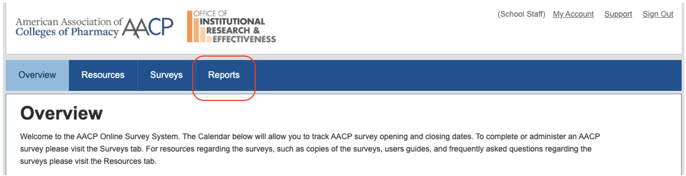
Then, click Reports to go to the Reports page.
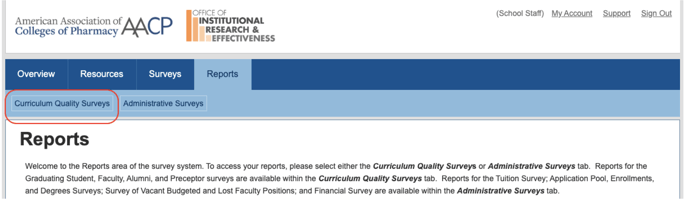
Click the link to Curriculum Quality Surveys.
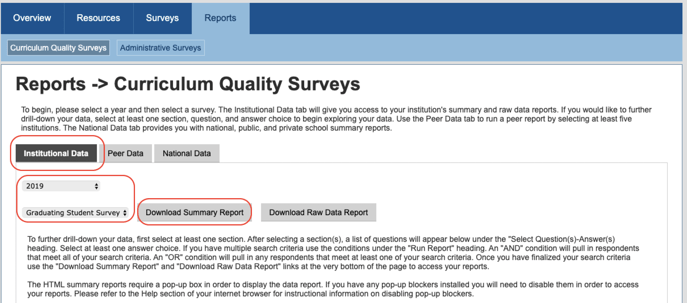
For your school's data, click the Institutional Data tab and select the appropriate Year and survey type (Faculty, Alumni, Preceptor, or Graduating Student). Then, click the Download Summary Report button.
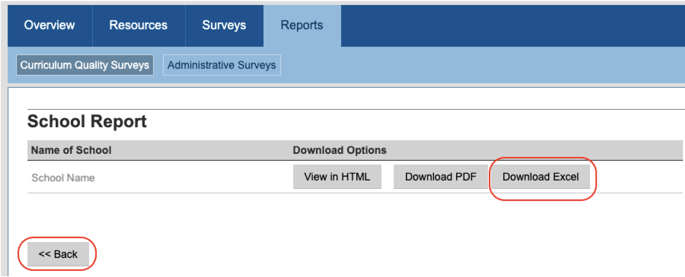
Make sure that you click Download Excel from the Download Options. Once the file has downloaded, click the <<Back button to return to the selections screen.
-
Repeat steps 4 & 5 for every Year and Survey Type that you would like to see included in your AACP Surveys dashboard.
-
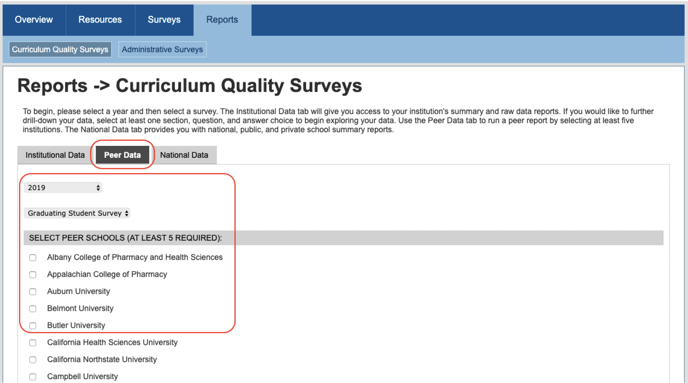
Next, you will need to download Peer Data for every Year and Survey Type you have provided School data for. Click the
Peer Data tab and select the appropriate Year and Survey Type. Make sure that you select the appropriate Peer Schools as well as using the checkboxes.
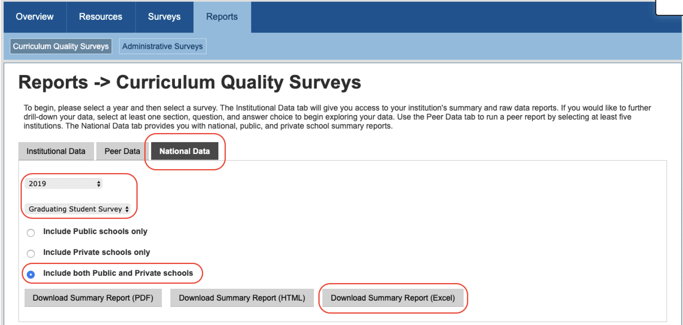
If requested by Enflux, you may also need to download National Data in addition to your Peer and School data. To do so, click the National Data tab and select the appropriate Year and Survey Type, making sure to select the Include both Public and Private schools radio button. Then, click Download Summary Report (Excel).